Monday, 11 September 2006
Friendly Form Field Highlighting
Last updated : 11th September 2006
Background
You have a form based input screen that users must navigate. The problem is that there are a number fields on display and the user is getting lost when they move there eyes away from the screen. Especially true if users are not good typists.
Strategy
We will change the background colour of the currently selected form field. This will stand out from the other fields and make it easy for our user to find it on the screen.
We will handle the focus and blur events using client side JavaScript to dynamically change the CSS class of the control and thus change the background colour.
Implementation
First, let's see how the final result should look. Notice how the currently selected field is differently coloured to the rest of the form fields.

Step 1 - Add the CSS
We will start of by adding two simple CSS classes. One that can be applied to the form field when the user enters it and another to reset it back to its default display when the user exits the field.
.normalfld
{
    background-color: #FFFFFF;
}
.focusfld
{
    background-color: #FFFFCC;
}
Step 2 - Add the JavaScript
We need to use client side code to change the CSS class assigned to the form field. There are a number of ways to add this in ASP.NET projects. One practice, which I'm not a great fan of, is to use the ClientScriptManager classes. For this example I will create a simple JavaScript file and attach it to the page using standard HTML <script> notation.
function DoBlur(fld) {
    fld.className='normalfld';
}

function DoFocus(fld) {
    fld.className = 'focusfld';
}
Step 3 - Plumbing the JavaScript
We will add the plumbing to the ASP.NET form controls in the Page_Load event of the page. We loop through all the controls on the form and add the necessary events to our target fields. In this case we are searching for only textboxes.
   Protected Sub Page_Load(ByVal sender As Object, ByVal e As System.EventArgs) Handles Me.Load
        If Not Page.IsPostBack Then
            SetHighlightFields(Page.Form)
            Me.txtForename.Focus()
        End If
    End Sub

    Sub SetHighlightFields(ByVal frm As Control)
        Dim TempCheckbox As CheckBox = Nothing
        Dim TempTextBox As TextBox = Nothing
        For Each tmpctl As Control In frm.Controls
            If TypeOf tmpctl Is TextBox Then
                TempTextBox = CType(tmpctl, TextBox)
                TempTextBox.Attributes.Add("onFocus", "DoFocus(this);")
                TempTextBox.Attributes.Add("onBlur", "DoBlur(this);")
            End If
        Next
    End Sub

    Sub ClearFields(ByVal frm As Control)
        For Each tmpctl As Control In frm.Controls
            If TypeOf tmpctl Is TextBox Then
                CType(tmpctl, TextBox).Text = ""
            End If
        Next
    End Sub
That's all there is to it. Now when the user tabs or clicks through in your form each field will be highlighted when it receives the focus.
Summary
This has hopefully given you a few ideas of your own on how to provide some 'value add' features to your web applications. As you can see from the code, or lack of it, it's easy to implement this functionality. When developing, try to imagine your application from the users perspective who is going to be using it 8 hours a day!

Saturday, 2 September 2006
Friendly GridView Deletion Messages
Last updated : 2nd September 2006
Background
You know the scenario. You present a whole load of tabular data to users in a GridView. You may have reduced the font-size so you can cram in an extra couple of rows from the database. You have an Edit and Delete LinkButtons there. So you think well I'll put in a piece of client script to make sure my users get a confirmation pop-up when they are about to delete a record. I'll code the nice OnClientClick event on the LinkButton and put in a 'Are you sure you wish to delete the record' message.
But wait a minute - my users are not that accurate with the mouse - I'm not that accurate with the mouse. And that font is quite small. How do I make 100% sure that they know exactly what record will be deleted?
Well I'll show you how to include some personal information in your pop-up message so there's no mistakes.
Strategy
We need to add a Delete LinkButton into a template field in the GridView. When the GridViews RowDataBound event fires for each row we want to set the onClientClick property of the LinkButton with a personalised message
Implementation
We have a users table that is bound to an ObjectDataSource which in turn is bound onto a GridView control. The GridView code is shown below.
<asp:GridView ID="GvUsers" runat="server" DataKeyNames="ID" AutoGenerateColumns="False"
     AutoGenerateEditButton="true" DataSourceID="ObjectDataSource1">
  <Columns>
    <asp:TemplateField ShowHeader="False">
    <ItemTemplate>
       <asp:LinkButton ID="DeleteUser" runat="server" CausesValidation="False" CommandName="Delete"
           Text="Delete"></asp:LinkButton>
    </ItemTemplate>
    </asp:TemplateField>
    <asp:BoundField DataField="ID" Visible="False" HeaderText="ID" ReadOnly="True" SortExpression="ID" />
    <asp:BoundField DataField="Name" HeaderText="Name" SortExpression="Name" />
    <asp:BoundField DataField="Email" HeaderText="Email" SortExpression="Email" />
    <asp:BoundField DataField="Telephone" HeaderText="Telephone" SortExpression="Telephone" />
    <asp:BoundField DataField="Hiredate" HeaderText="Hiredate" SortExpression="Hiredate" />
 </Columns>
</asp:GridView>
If you look at the GridView properties you will see that we have set AutoGenerateEditButton to true but have not auto generated the delete button. We have created a template field and added a LinkButton to it with ID="DeleteUser". Note the CommandName="Delete" which auto-wires the delete button to the GridView.
Next step is to code up the GridViews RowDataBound event. As each row is bound to the GridView we search for the Delete LinkButton and customise the OnClientClick property. We use a simple JavaScript confirm function that returns true if the user clicks OK, otherwise false.
Protected Sub GvUsers_RowDataBound(ByVal sender As Object, _
              ByVal e As System.Web.UI.WebControls.GridViewRowEventArgs) _
              Handles GvUsers.RowDataBound
        ' add a confirm button to the delete button
        ' We are only interested in datarows
        If e.Row.RowType = DataControlRowType.DataRow Then
            ' make sure we can find the control first
            If e.Row.FindControl("DeleteUser") IsNot Nothing Then
                ' cast it to a LinkButton and set the client script
                CType(e.Row.FindControl("DeleteUser"), LinkButton).OnClientClick = _
                            "return confirm('Are you sure you want to delete " & _
                            e.Row.Cells(3).Text.Replace("'", "\'") & _
                            " from the database?');"
            End If
        End If
End Sub
You can see we are concatenating a display message with a value from the Name field on the GridView. Single quotes cause issues with the JavaScript so we need to escape them by prefixing them with a backslash e.Row.Cells(3).Text.Replace("'", "\'"). This takes care of names like O'Malley etc.
Now when your users hit delete they will receive a much more detailed message like the one below.

Summary
As you can see this is a very simple technique to add into your web applications. I think this approach is much better than having users on the phone asking for a database restore as they have mistakenly deleted your top customer!
Optimistic Concurrency With SQL Server Rowversion Data Type
Last updated : 2nd September 2006
Background
You are developing a multi-user web based system that involves users updating shared data. Therefore you need to make sure that users do not overwrite each others updates. For deletes, you want to make sure that the record to be deleted has not been modified by another user between the time you retrieved it from the database and the time you eventually delete it.
SQL Server has column type rowversion (synonym timestamp) which automatically changes its value whenever a row is modified in the database. This makes it an ideal candidate to enforce an optimistic concurrency solution. The rowversion field contains a binary value of 8 bytes.
Strategy
We will use a GridView bound to an ObjectDataSource to present the data to our users. We then retrieve the rowversion binary value from SQL Server as part of the data. As we need this value to validate our updates and deletes we will convert it to a string representation and hold it in the Gridview.
On updates and deletes we will convert the rowversion string representation back into a binary value and use this to qualify the SQL update and delete statements.
I will split this tutorial in to four main sections.
Step 1 - Table Design
We will create a simple users table to demonstrate this technique. We will create a unique index on the email field to prevent duplicate email addresses in the system. This should prevent records being created twice by different users.
CREATE TABLE [dbo].[Users](
    [id] [int] IDENTITY(1,1) NOT NULL PRIMARY KEY CLUSTERED,
    [Name] [nvarchar](50) NOT NULL,
    [Email] [nvarchar](50) NOT NULL,
    [Telephone] [nvarchar](50) NULL,
    [Hiredate] [datetime] NULL,
    [Dataversion] [rowversion] NOT NULL
    )

CREATE UNIQUE NONCLUSTERED INDEX [IX_UsersUniqueEmail] ON [dbo].[Users]
(
    [Email] ASC
) ON [PRIMARY]
Step 2 - Stored Procedures
Create stored procedures to perform CRUD activities against the database
- Select all users
- Insert a new user
- Update a users details
- Delete a user
The select stored procedure just grabs all users from the database. The Insert is straight forward, any duplicates entries will fail because of the unique index we have on the email address.
On the Update stored procedure note the WHERE clause. We are updating the record based on the rows unique identifier AND the rowversion that we previously retreived from the database. Remember, if there any data modifications on that row SQL Server will change the rowversion value automatically. So if the row was changed the update will affect zero rows.
Again for the Delete stored procedure note the WHERE clause. we qualify both the unique identifier AND the rowversion value.
-- =============================================
-- Author: Martin Millar
-- Create date: Sat 12th Aug 2006
-- Description: Retreive all users in the database
-- Large tables may require paging
-- Version: 1.0
-- =============================================
CREATE PROCEDURE [dbo].[proc_SelectUsers]
AS
BEGIN
SET NOCOUNT ON;
SELECT [id]
,[Name]
,[Email]
,[Telephone]
,[HireDate]
,[Dataversion]
FROM [Users]
END
-- =============================================
-- Author: Martin Millar
-- Create date: Sat 12th Aug 2006
-- Description: Insert new user in database
-- Version: 1.0
-- =============================================
CREATE PROCEDURE [dbo].[proc_UserInsert]
@Name nvarchar(50),
@Email nvarchar(50),
@Hiredate datetime,
@Telephone nvarchar(50)
AS
BEGIN
INSERT INTO [Articles].[dbo].[Users]
([Name]
,[Email]
,[Telephone]
,[Hiredate])
VALUES
(@Name
,@Telephone
,@Hiredate)
END
-- =============================================
-- Author: Martin Millar
-- Create date: Sat 12th Aug 2006
-- Description: Update user details
-- Version: 1.0
-- =============================================
CREATE PROCEDURE [dbo].[proc_UpdateUser]
@ID int,
@Name nvarchar(50),
@Email nvarchar(50),
@Telephone nvarchar(50),
@Hiredate datetime,
@Dataversion rowversion
AS
BEGIN
UPDATE [Users]
SET [Name] = @Name
,[Email] = @Email
,[Telephone] = @Telephone
,[Hiredate] = @Hiredate
WHERE (ID=@ID) AND (Dataversion = @Dataversion)
END
-- =============================================
-- Author: Martin Millar
-- Create date: Sat 12th Aug 2006
-- Description: Deletes user from the database
-- Version: 1.0
-- =============================================
CREATE PROCEDURE [dbo].[proc_DeleteUser]
@ID int,
@Dataversion rowversion
AS
BEGIN
DELETE FROM [Users]
WHERE (ID = @ID) AND (Dataversion = @Dataversion)
END
Step 3 - Data Access Layer
For the data access layer I have implemented a static class with with a private constructor so that it can't be instantiated. I have 'garnished' the class definition with the <ComponentModel.DataObject()> attribute. Basically this allows the ObjectDataSource that we will use later on to correctly identify that this is a data component. I will also set method attributes on the Select, Insert, Update and Delete routines. Again this allows the ObjectDataSourceControl to easily identify which methods are used for CRUD operations.
I will be using the SQLClient classes of the System.Data namespace. The download comes with a SQL Express database. However I have included a sql script to add the necessary objects to a SQL 2000/2005 database.
Select Method
I will be returning a DataTable back to the UI layer containing all rows in the user table.
<ComponentModel.DataObjectMethodAttribute(ComponentModel.DataObjectMethodType.Select, True)> _
Public Shared Function FillUsers() As DataTable
    Using connection As New SqlConnection( _
        ConfigurationManager.ConnectionStrings("MySQLDatabase").ConnectionString)
        Using command As New SqlCommand()
            command.Connection = connection
            command.CommandType = CommandType.StoredProcedure
            command.CommandText = "proc_SelectUsers"
            Using adapter As New SqlDataAdapter(command)
                Dim table As DataTable = New DataTable
                adapter.Fill(table)
                Return table
            End Using
        End Using
    End Using
End Function
Insert Method
Before I go through this I'll quickly touch on nullable types. The Telephone and HireDate fields are nullable in our database. This is not a problem for string values as they are reference types and intrinsically have the concept of null or nothing values. However HireDate is a datetime value which is a value type.
Value types are stored on the stack and have no concept of nulls. Hence we need to add this functionality by wrapping it in a nullable structure. When we do this we can check the .HasValue property to check for nulls.
The insert method checks the RowsAffected property of the ExecuteNonQuery method and throws an exception if the insert has failed. Remember though we have a unqiue index on email so duplicate records will throw a SQLException prior to this.
<ComponentModel.DataObjectMethodAttribute(ComponentModel.DataObjectMethodType.Insert, True)> _
Public Shared Sub InsertUser(ByVal name As String _
                            , ByVal email As String _
                            , ByVal telephone As String _
                            , ByVal hireDate As Nullable(Of Date))

    Dim RecsAffected As Int32 = 0
    Using connection As New SqlConnection(ConfigurationManager.ConnectionStrings("MySQLDatabase").ConnectionString)
        Using command As New SqlCommand()
            command.Connection = connection
            command.CommandType = CommandType.StoredProcedure
            command.CommandText = "proc_UserInsert"

            ' Add the parameters
            command.Parameters.Add(New SqlParameter("Name", name))
            command.Parameters.Add(New SqlParameter("Email", email))
            command.Parameters.Add(New SqlParameter("Telephone", IIf(telephone IsNot Nothing, telephone, System.DBNull.Value)))
            ' Hiredate in SQL Table is nullable so we need to wrap the value type
            ' in the nullable wrapper and check for the existance of a value
            command.Parameters.Add(New SqlParameter("HireDate", IIf(hireDate.HasValue, hireDate, System.DBNull.Value)))

            ' open, execute and return
            connection.Open()
            RecsAffected = command.ExecuteNonQuery
            If RecsAffected <> 1 Then
                Throw New ApplicationException("Failed to insert new user into the database.")
            End If
        End Using
    End Using
End Sub
Update Method
Note the signature on the update method. When coding data components it's worth remembering the idiosyncrasies of the controls that you will be using.
For example, I'm using original_id name as input parameter to the update method. Why? - because by default the ObjectDataSource will hold this key value in the a collection prefixed with original_.
This can be changed by modifying the attribute in the Object DataSource.
OldValuesParameterFormatString="original_{0}"
Also note that I'm passing the rowversion in as a byte array. As you will see later, you could just as easily pass this in as a string and perform a coversion back to a byte array value in method itself.
<ComponentModel.DataObjectMethodAttribute(ComponentModel.DataObjectMethodType.Update, True)> _
Public Shared Sub UpdateUser(ByVal original_id As Int32 _
                            , ByVal name As String _
                            , ByVal email As String _
                            , ByVal telephone As String _
                            , ByVal hireDate As Nullable(Of Date) _
                            , ByVal dataVersion As Byte())


    Dim RecsAffected As Int32 = 0

    Using connection As New SqlConnection(ConfigurationManager.ConnectionStrings("MySQLDatabase").ConnectionString)
        Using command As New SqlCommand()
            command.Connection = connection
            command.CommandType = CommandType.StoredProcedure
            command.CommandText = "proc_UpdateUser"

            ' Add the parameters
            command.Parameters.Add(New SqlParameter("ID", original_id))
            command.Parameters.Add(New SqlParameter("Name", name))
            command.Parameters.Add(New SqlParameter("Email", email))
            command.Parameters.Add(New SqlParameter("Telephone", IIf(telephone IsNot Nothing, telephone, System.DBNull.Value)))

            ' Hiredate in SQL Table is nullable so we need to wrap the value type
            ' in the nullable wrapper and check for the existance of a value
            command.Parameters.Add(New SqlParameter("HireDate", IIf(hireDate.HasValue, hireDate, System.DBNull.Value)))

            ' Now pass in the DataRowVersion that was retrieved from the database
            ' We compare this with the value currently in the database. If these
            ' values differ we do NOT want to overwrite with our changes
            command.Parameters.Add(New SqlParameter("DataVersion", dataVersion))

            ' open, execute and return
            connection.Open()
            RecsAffected = command.ExecuteNonQuery
            If RecsAffected <> 1 Then
                Throw New ApplicationException("Another user has changed this record. " & _
                                            "Your update was cancelled.")
            End If
        End Using
    End Using
End Sub
Delete Method
For the delete method we will need both the ID and the Dataversion of the row to delete. Again I'm sticking to the format original_ prefix.
<ComponentModel.DataObjectMethodAttribute(ComponentModel.DataObjectMethodType.Delete, True)> _
   Public Shared Sub DeleteUser(ByVal original_id As Int32 _
                               , ByVal original_dataVersion As Byte())

    ' We only want to delete if the user has the latest version of the record
    Dim RecsAffected As Int32 = 0

    Using connection As New SqlConnection(ConfigurationManager.ConnectionStrings("MySQLDatabase").ConnectionString)
        Using command As New SqlCommand()
            command.Connection = connection
            command.CommandType = CommandType.StoredProcedure
            command.CommandText = "proc_DeleteUser"

            ' Add the parameters
            command.Parameters.Add(New SqlParameter("ID", original_id))

            ' Now pass in the DataRowVersion that was retrieved from the database
            ' We compare this with the value currently in the database. If these
            ' values differ we do NOT want to delete it
            command.Parameters.Add(New SqlParameter("DataVersion", original_dataVersion))

            ' open, execute and return
            connection.Open()
            RecsAffected = command.ExecuteNonQuery
            If RecsAffected <> 1 Then
                Throw New ApplicationException("Another user has changed this record. " & _
                                            "User has NOT been deleted.")
            End If
        End Using
    End Using
End Sub
Thats the data access sorted so we'll moved to the user interface.
Step 4 - User Interface
For the user interface we will use a GridView control that is wired to an ObjectDataSource. For inserts I have just created some textboxes but you could easily use the FormView or DetailsView controls. The finished page is shown below.

So first drag an ObjectDataSource onto the web form and set the Business Object to the data access class. Because we set the proper method attributes on the business object all the methods will be pre-selected. I have included screenshots for reference.


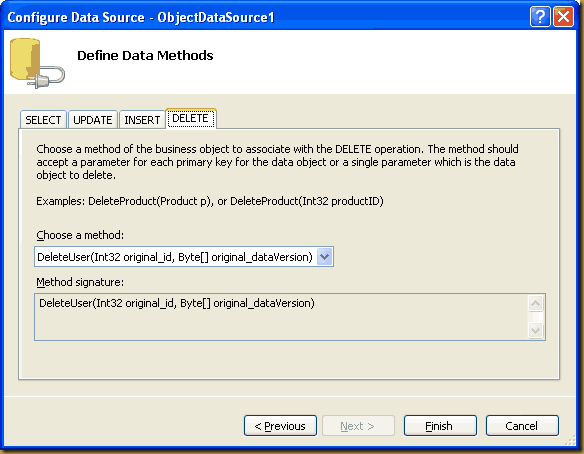
In the source code of the page you should now see the following mark-up.
<asp:ObjectDataSource ID="ObjectDataSource1" runat="server" DeleteMethod="DeleteUser"
        InsertMethod="InsertUser" OldValuesParameterFormatString="original_{0}"
        SelectMethod="FillUsers"
        TypeName="Bracora.Articles.Users" UpdateMethod="UpdateUser">
    <DeleteParameters>
         <asp:Parameter Name="original_id" Type="Int32" />
         <asp:Parameter Name="original_dataVersion" Type="Object" />
    </DeleteParameters>
    <UpdateParameters>
         <asp:Parameter Name="original_id" Type="Int32" />
         <asp:Parameter Name="name" Type="String" />
         <asp:Parameter Name="email" Type="String" />
         <asp:Parameter Name="telephone" Type="String" />
         <asp:Parameter Name="hireDate" Type="DateTime" />
         <asp:Parameter Name="dataVersion" Type="Object" />
    </UpdateParameters>
    <InsertParameters>
         <asp:Parameter Name="name" Type="String" />
         <asp:Parameter Name="email" Type="String" />
         <asp:Parameter Name="telephone" Type="String" />
         <asp:Parameter Name="hireDate" Type="DateTime" />
    </InsertParameters>
</asp:ObjectDataSource>
Next, drag on a GridView Control and set its datasource to the ObjectDataSource. I like to manually specify the fields so I set the AutoGenerateColumns to false. I have also created two template columns.
- One for the Delete button as we want to specify a custom JavaScript confirmation to fire. I don't like the standard 'Are you sure you wish to delete this?' type message. For more information on this see my article here
- One is for a hidden label to hold the rowversion data which is converted into a string representation as it binds to the grid. Look for the code below in the DataRowVersion template field :
System.Convert.ToBase64String(Eval("DataVersion"))
This gives us access to this value during updates and deletes.
The final GridView markup is shown below.
<asp:GridView ID="GvUsers" runat="server" DataKeyNames="ID" AutoGenerateColumns="False"
   AutoGenerateEditButton="true" DataSourceID="ObjectDataSource1">
      <Columns>
         <asp:TemplateField ShowHeader="False">
             <ItemTemplate>
                  <asp:LinkButton ID="DeleteUser" runat="server" CausesValidation="False"
                   CommandName="Delete" Text="Delete"></asp:LinkButton>
             </ItemTemplate>
             </asp:TemplateField>
             <asp:BoundField DataField="ID" Visible="False" HeaderText="ID" ReadOnly="True" SortExpression="ID" />
             <asp:BoundField DataField="Name" HeaderText="Name" SortExpression="Name" />
             <asp:BoundField DataField="Email" HeaderText="Email" SortExpression="Email" />
             <asp:BoundField DataField="Telephone" HeaderText="Telephone" SortExpression="Telephone" />
             <asp:BoundField DataField="Hiredate" HeaderText="Hiredate" SortExpression="Hiredate" />
             <asp:TemplateField Visible="False" HeaderText="DataRowVersion">
                 <ItemTemplate>
                    <asp:Label runat="server" ID="DataVersion"
                   Text='<%# System.Convert.ToBase64String(Eval("DataVersion")) %>'>
                    </asp:Label>
                 </ItemTemplate>
           </asp:TemplateField>
       </Columns>
</asp:GridView>
All we need to do is plug in the code to handle CRUD operations in the user interface.
Both the GridView and the ObjectDataSource have complimentary events that fire during CRUD changes. I refer to these as ing and ed events e.g.
- RowUpdating and RowUpdated
- RowDeleting and RowDeleted
- Inserting and Inserted
- .......
The ing events allow you to perform processing before your database operation such as validation, business rules checks....etc
The ed events allow you to perform processing after the database operation such as exception handling, clean-up code...etc
I'll take each operations in turn
GridView - Update
For updates, we want to make sure that if we submit a change to the database that we do not overwrite any changes that another user may have made while we were in the process of editing the record. Remember multiple users will have access to the same common data.
We only update the row if the rowversion we fetched from the database is the same as the one that is currently stamped on that row in SQL Server.
As mentioned before we do this by qualifying this in the WHERE clause of the Update statement.
To handle Updates we will use the GridView_RowUpdating and ObjectDataSource_Updated events.
GridView_RowUpdating - We have access to the NewValues dictionary at this point which is passed to ObjectDataSource for the update operation. The non key parameters are already populated. However we need to set the value of the original_rowversion parameter from the hidden Label control in the Template field of the GridView and convert it from its string representation back into a byte array.
ObjectDataSource_Updated - We just check to see if there were any exceptions and display them in the UI. Make sure you set the e.ExceptionHandled = True otherwise the exception will continue to bubble up.
Protected Sub GvUsers_RowUpdating(ByVal sender As Object, _
                        ByVal e As System.Web.UI.WebControls.GridViewUpdateEventArgs) _
                        Handles GvUsers.RowUpdating
        e.NewValues("DataVersion") = _
            Convert.FromBase64String(CType(Me.GvUsers.Rows(e.RowIndex).FindControl("DataVersion"), Label).Text)
End Sub


Protected Sub ObjectDataSource1_Updated(ByVal sender As Object, _
                            ByVal e As System.Web.UI.WebControls.ObjectDataSourceStatusEventArgs) _
                            Handles ObjectDataSource1.Updated
        ' handle any Update exceptions here
        If e.Exception IsNot Nothing Then
            DisplayUIError(IIf(e.Exception.InnerException Is Nothing, e.Exception.Message, e.Exception.InnerException.Message))
            e.ExceptionHandled = True
        End If
End Sub
GridView - Delete
When deleting records from the GridView we don't want users to delete rows that may have been modified by another user after the data was retrieved.
To handle Deletes we will use the GridView_RowDeleting, ObjectDataSource_Deleting and ObjectDataSource_Deleted events.
GridView_RowDeleting - We store a string representation of the Dataversion field for the deleted row in a page level variable called DeletedRowVersion. This is taken from the hidden Label control in the Template field of the GridView.
ObjectDataSource_Deleting - We have access to the InputParameters dictionary at this point which is used for the delete operation. The original_ID is already populated because it is the DataKeyField of the GridView. Therefore we just need to set the value of the original_rowversion parameter. We get this from the Page variable DeletedRowVersion which we set when the GridView entered edit mode. We convert this from its string representation back into a byte array.
ObjectDataSource_Deleted - We just check for exceptions and display them in the UI.
Protected DeletedRowVersion As String

Protected Sub GvUsers_RowDeleting(ByVal sender As Object, _
              ByVal e As System.Web.UI.WebControls.GridViewDeleteEventArgs) _
              Handles GvUsers.RowDeleting

              DeletedRowVersion = CType(Me.GvUsers.Rows(e.RowIndex).FindControl("DataVersion"), Label).Text
End Sub


Protected Sub ObjectDataSource1_Deleting(ByVal sender As Object, _
              ByVal e As System.Web.UI.WebControls.ObjectDataSourceMethodEventArgs) _
              Handles ObjectDataSource1.Deleting

              Dim DeleteParams As IDictionary = e.InputParameters
              DeleteParams("original_dataVersion") = Convert.FromBase64String(DeletedRowVersion)
End Sub


Protected Sub ObjectDataSource1_Deleted(ByVal sender As Object, _
              ByVal e As System.Web.UI.WebControls.ObjectDataSourceStatusEventArgs) _
              Handles ObjectDataSource1.Deleted

              ' handle any delete exceptions here
              If e.Exception IsNot Nothing Then
                    DisplayUIError(IIf(e.Exception.InnerException Is Nothing, e.Exception.Message, e.Exception.InnerException.Message))
                    e.ExceptionHandled = True
              End If
End Sub
GridView - Inserts
For the inserts we will just create an input form above the GridView. The use of a FormView or DetailsView control is perfectly valid as well. I have included the code for reference.
<fieldset>
   <legend>New User Details</legend>
       <table>
          <tr style="font-weight: bold;">
            <td>
             Name<br />
             <asp:TextBox ID="txtName" runat="server"></asp:TextBox></td>
            <td>
             Email<br />
             <asp:TextBox ID="txtEmail" runat="server"></asp:TextBox>
           </td>
           <td>
             Telephone<br />
              <asp:TextBox ID="txtTelephone" runat="server"></asp:TextBox>
            </td>
            <td>
              Hire Date<br />
              <asp:TextBox ID="txtHireDate" runat="server"></asp:TextBox>
            </td>
             <td>
               <br />
                <asp:Button ID="btnAddUser" runat="server" Text="Add New User" />
            </td>
              </tr>
        </table>
</fieldset>
Concurrency is not so much of an issue on the insert. However we do want to prevent two users keying in duplicate data. For example, Operator A keys in 50 new clients from a list of paper forms. Operator B comes in on the next shift, sees the paper forms and keys them in again.
To prevent this we have set up a unique index on email address. An SQLException will be thrown if any attempt is made to insert duplicate email addresses.
Here is the Insert code
Protected Sub btnAddUser_Click(ByVal sender As Object, ByVal e As System.EventArgs) Handles btnAddUser.Click
        Try
            Dim tmpHireDate As DateTime
            If txtHireDate.Text.Trim <> "" Then
                ' must be value, so check it
                DateTime.TryParse(txtHireDate.Text.Trim, tmpHireDate)
                If tmpHireDate = DateTime.MinValue Then
                    DisplayUIError("The Hire date is not recognised as a valid date. Please correct.")
                    Exit Try
                End If
            End If

            Bracora.Articles.Users.InsertUser(txtName.Text.Trim _
                                            , txtEmail.Text.Trim _
                                            , txtTelephone.Text.Trim _
                                            , IIf(tmpHireDate = DateTime.MinValue, Nothing, tmpHireDate))

            Me.GvUsers.DataBind()

        Catch ex As Exception
            DisplayUIError(ex.Message)
        End Try
End Sub
Summary
In this article I have presented you with one technique to control modifications to shared data in multi-user environments. The rowversion column type is an ideal candidate for handling concurrency with SQL Server databases. Just to reiterate there are other methods to handle this situation but I think this is particularly 'clean'. Hopefully you will take this example and enhance it to suit your own situation. You may want to automatically re-load the data back into the UI if changes have occurred. It's up to you (or your customer) to decide the best route for each application.

Author : Sanderson
Subscribe


 Posts
All Comments
Posts
All Comments